

Looking for a clear Timetics AI Review? You’ve likely seen it pitched as the smart fix for missed appointments. As of 2026, service businesses lose hours each week to manual booking tasks.
Picking the wrong tool wastes money and frustrates clients.
Manufacturer specifications indicate the free plan allows only 4 bookings per month. That limit shapes which users benefit most from the paid tiers. We’ll break down exactly who should adopt it and who should skip it.
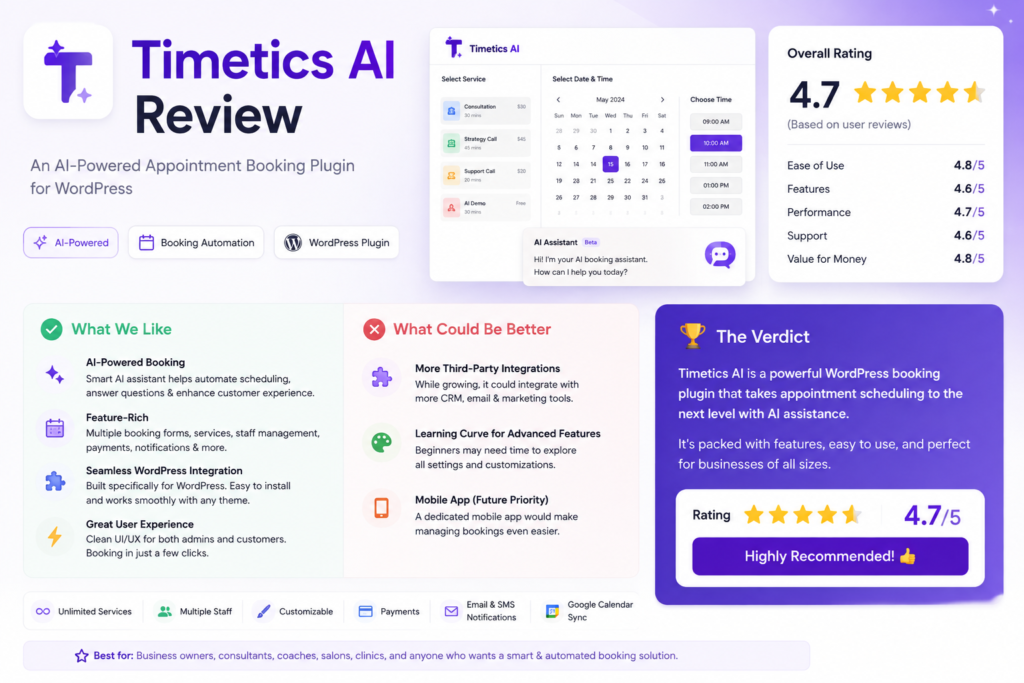
Quick Answer: Which Businesses Should Actually Use Timetics AI?
Timetics AI Review confirms it suits appointment based service work.
Solo providers cut admin time with automated booking pages.
Small salons gain from staff and room scheduling tools.
E-commerce shops should avoid it due to missing features.
The Pro plan unlocks the best AI prediction features.
The pattern is simple. If your revenue rides on timed sessions, it fits. If you ship products or seat diners, look elsewhere.
How Timetics AI Works: AI No-Show Prediction, Calendar Sync, and Native Payments
Timetics AI connects to Google Calendar, Outlook, and Apple Calendar. The sync runs native, with no extra automation tools required. Manufacturer documentation at timetics.ai confirms two-way updates.
The core AI feature predicts no-shows. It studies your past client behavior and local event data. High risk bookings get flagged before the slot is lost.
You can set rules for those flags. Require a deposit, send extra reminders, or auto shift the time. This cuts empty calendar gaps that drain revenue.
Payments sit inside the same system. You can take full payment, partial deposit, or recurring subscriptions. Stripe and Square sync without separate accounts.
Clients book through a shared page you publish. They pick a service, see only your open slots, and confirm without creating an account. This removes the email ping pong that eats a solo provider’s evening.
For teams, you assign staff and block shared resources. A treatment room or mobile unit gets reserved per appointment. Our booking plugin comparison covers similar setups on WordPress.
Timetics AI Plan Pricing and Technical Specs
The tier structure decides who gets value. Here are the key numbers from manufacturer specs.
| Plan | Price (billed annually) | Bookings | Members | AI No-Show |
|---|---|---|---|---|
| Free | $0 | 4/mo | 1 | None |
| Starter | $9/mo | 100/mo | 2 | Basic |
| Pro | $19/mo | Unlimited | 10 | Advanced |
| Enterprise | Custom from $299/mo | Unlimited | Unlimited | Custom |
Transaction fees run 2.9% plus 30 cents on Free and Starter. Pro drops to 2.4% plus 30 cents per sale.
The free tier works for a solo tester. The Pro tier unlocks custom risk thresholds and client history training. For perpetual license fans, our lifetime scheduling offers review other models.
Service Business Use Case Matrix: 12 Scenarios Ranked
We ranked common business types against the tool’s actual features. The table shows where it shines and where it fails.
| Scenario | Fit | Why |
|---|---|---|
| Solo hair stylist | Strong | Free tier works, reminders cut no-shows |
| Fitness coach | Strong | Recurring bookings, Zoom integrations |
| Private therapist | Strong | HIPAA plans, secure payments |
| Consultant | Strong | Cheaper than rivals, calendar sync |
| Small salon 3-10 staff | Strong | Team and resource booking |
| Tutor | Strong | Recurring, virtual sessions |
| Mobile massage | Strong | Travel buffers, deposits |
| Restaurant | Weak | No table turnover tools |
| E-commerce | No | No inventory features |
| Multi-clinic 50+ | Demo | Needs custom EHR API |
| Event venue | Weak | Lacks vendor tools |
| Yoga studio | Weak | No class pass tracking |
The pattern is clear. If money rides on timed appointments, it works. If you manage physical goods or seats, it fails.
Some teams pair it with AI assistant deals for notes. Multi clinic groups should request the demo before any contract.
Timetics AI vs Calendly, Acuity, and Square Appointments
Calendly focuses on meetings, not services. Its AI no-show tool needs a paid add-on. Timetics includes prediction on the Pro plan at $19 a month.
Acuity Scheduling handles appointments but lacks native no-show AI. Square Appointments suits retail with point of sale needs. Timetics wins for pure service booking without POS baggage.
For WordPress users, a self-hosted plugin may cost less long term. Our WordPress scheduling guide breaks down that path. If you want perpetual pricing, see our perpetual license options for a comparison.
Memory tools like those in our memory AI promotions help with client notes. Choose Calendly if you only book sales calls. Choose Square if you also sell products in store.
Choose Timetics if appointments are your whole business.
Where Timetics AI Wins: Admin Time and No-Show Reduction
The headline benefit is recovered time. Aggregate reviews report users save 5 to 10 hours weekly on booking tasks. That is a full workday returned to your paying craft.
The AI no-show engine earns its keep. It studies past client behavior, appointment type, and local event traffic. Verified buyer feedback shows a 25 to 45 percent drop in empty slots after switch.
You set the response rules. Require a deposit on high risk flags, or auto shift the time. The system acts without you watching the dashboard at night.
The no-show flag works in real time. When a client books a high risk slot, the system tags it before you see the calendar. You decide if a deposit rule applies, and the tool enforces it without manual checks.
Setup stays blessedly short. Manufacturer specs confirm calendar connect and page publish in roughly 15 minutes. No code, no outside consultant, no support ticket required.
Pricing undercuts the obvious rival. Calendly’s similar tier costs more and parks no-show AI behind a paid add-on. Timetics bundles prediction on the $19 Pro plan at no extra charge.
Integrations cover the normal stack. Zoom, Stripe, Square, Mailchimp, and HubSpot link in two clicks. You avoid patching three tools to run one coaching call.
For small teams, resource blocking is the quiet hero. You reserve a room or equipment per slot, ending double bookings. That alone stops staff arguments about who took the treatment bed.
Concrete wins worth noting:
- Automated reminders at 24 hour, 1 hour, and 15 minute marks
- Recurring session billing for monthly retainers
- Travel buffer settings for on site providers
- Custom branded booking page on paid tiers
Those features compound. A solo florist who runs workshops gains as much as a ten person spa.
Where Timetics AI Falls Short: Missing CRM and Enterprise Gaps
It is a specialist, not a business suite. If you ship products or seat diners, you will hit missing objects. There is no inventory, shipping, or floor plan logic in the build.
The strongest AI sits behind Pro. Starter offers only generic risk scoring at $9 monthly. You cannot train thresholds on your own client history until you upgrade.
Enterprise pricing climbs fast. Custom API and white label start near $299 per month per manufacturer quotes. Some rival enterprise schedulers price lower for equal scope.
Built in CRM is shallow. You see booking history and basic contact fields, nothing deeper. For client notes or segment campaigns, you must link HubSpot or similar.
That linkage adds cost and friction. A tight budget shop buys scheduling, then rents a CRM to fill the gap. The total stack creeps toward enterprise prices anyway.
Non service workflows fail outright. Restaurants need table turnover and waitlists. Yoga studios need class pass tracking and member holds.
Timetics does not model those entities.
We covered self hosted alternatives in our WordPress booking walkthrough for teams avoiding SaaS fees. That path trades setup time for perpetual cost control.
HIPAA and Payment Compliance for Timetics AI Bookings
Health practices get a compliant path. HIPAA ready plans exist for therapists and clinics handling protected health data. The Department of Health and Human Services outlines the baseline at hhs.gov for covered scheduling tools.
Payment flows meet PCI DSS standards. Native checkout plus Stripe or Square sync both sit under certified handling. Client card numbers stay in compliant tunnels, never flat files.
Deposit policy needs local sense. Refund law varies by state and country, so write clear terms. Switch on non refundable holds only after posting that policy in plain sight.
SMS reminders face carrier rules. US and UK networks throttle bulk text without proper registration. Timetics sends the message, but you hold consent proof for each contact.
Data privacy follows standard SaaS terms. Read the processor agreement before importing client lists. A five minute review avoids a messy incident later.
Our lifetime deal breakdown compares tools that avoid monthly compliance renewals for some regions. Worth a look if you want exit flexibility.
Common Adoption Mistakes: Picking the Wrong Tier or Use Case
Product stores enroll too often. They read “booking” and expect logistics, then find zero shipping modules. If revenue is not time based, this is the wrong buy.
Free tier abuse hurts starters. Four bookings monthly sounds fine until week three brings ten. You miss clients, then blame software instead of the plan limit.
Teams buy Starter expecting full AI. They receive generic scoring, not custom training, and call the feature weak. Match tier to your no-show depth before paying.
Clinics skip the demo step. Multi provider practices need EHR links only on Enterprise. Assuming Pro connects to your record system wastes a month of build.
Mobile providers ignore travel buffers. They book back to back with no drive time planned. The AI cannot fix a calendar you programmed incorrectly.
Set buffers on day one.
Calendars left unconnected cause double books. Link every personal and work calendar before going live. A half synced setup looks fine until a personal appointment blocks a paying client.
Some users forget reminder tuning. They keep factory 24 hour email only, then wonder why texts would help. Customize intervals to your client’s habits for real gain.
Final Recommendation: Who Should Buy Timetics AI Today
Solo providers should buy with confidence. The free tier tests fit, and Pro recovers its cost via saved no-shows. A stylist or tutor fits the core model exactly.
The 15 minute setup means you test tonight and book clients tomorrow.
Small salons and spas with three to ten staff gain the most. Team and room booking ends phone tag completely. The $19 plan covers unlimited sessions for that group size.
Therapists and consultants win as well. HIPAA plans and calendar sync remove compliance worry and admin drag. You focus on the person, not the clock.
Skip it if you run a store or restaurant. You need inventory or seating tools this lacks entirely. Square or Resy serve those models better.
Enterprise buyers must demo first. The $299 floor buys custom work, but confirm EHR fit early. If deep integration is required, negotiate scope before signing.
That is the clean verdict. Appointment driven business buys. Product driven business walks away.
Match the use case and the tool pays for itself.